Fixture Library
0
fixtures are already included
Missing one? Add the manufacturer’s DMX chart (PDF or photo). BITNA reads it on the device and builds the profile.
DMX Lighting Control · Mac · iPad · iPhone
Wireless DMX from your iPhone, no laptop needed. Lightning and police lights by name, video mapped onto your fixtures.
A DMX lighting controller for film sets and stages.
Why BITNA
Easy means shallow.
Powerful means hard.
Lighting software has always made you choose one.
BITNA doesn’t choose.
Live · Try it yourself
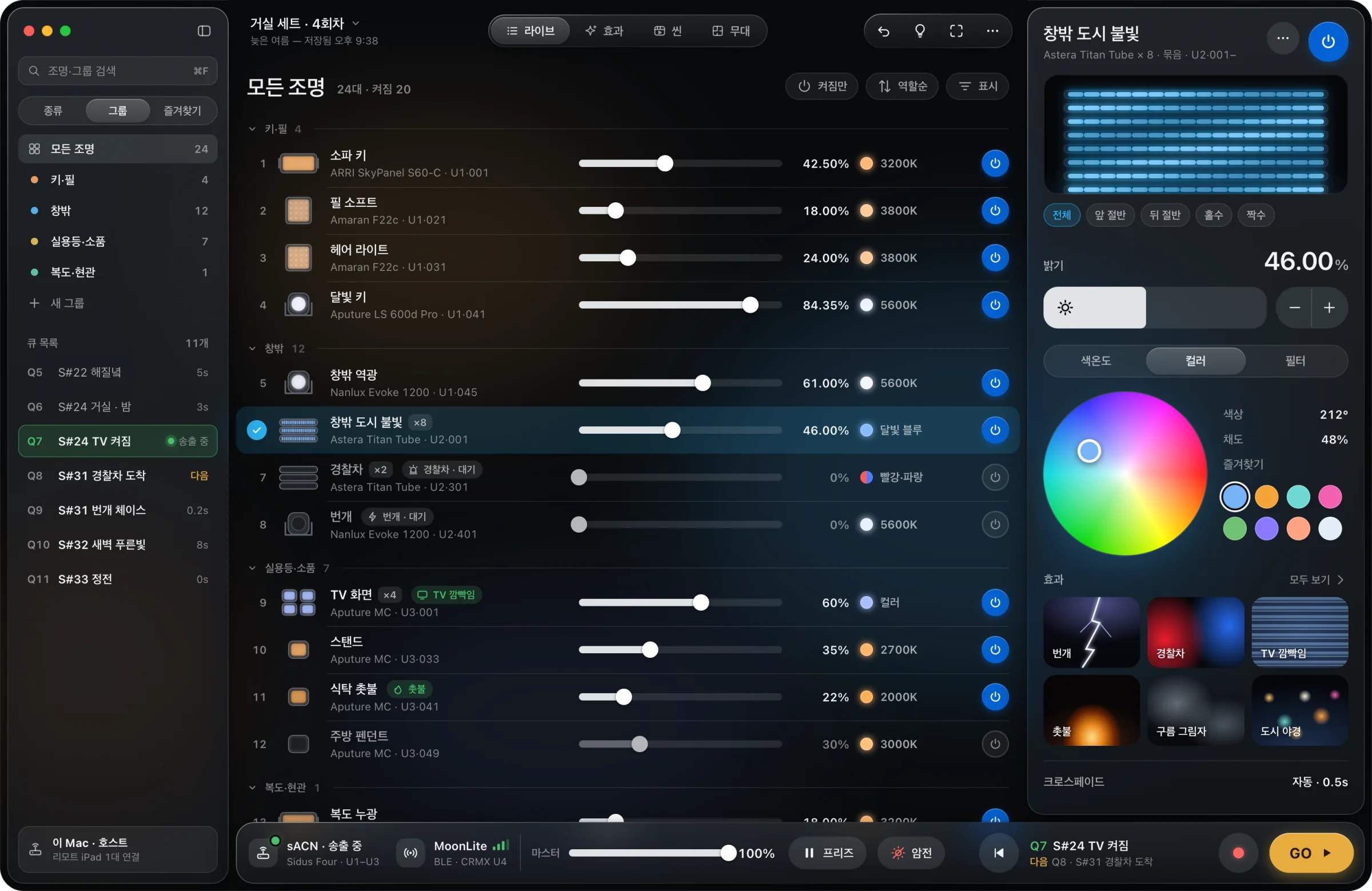
This is BITNA’s real Live screen, brought over as it is. Push a level, tap power, and press GO to call the next cue. The set on the right follows along.
Effects · For the camera
Police lights, lightning and TV flicker used to mean building chases on a console. In BITNA you pick them by name and adjust only speed and color. Every preview below is running live.
Stage · Set plan
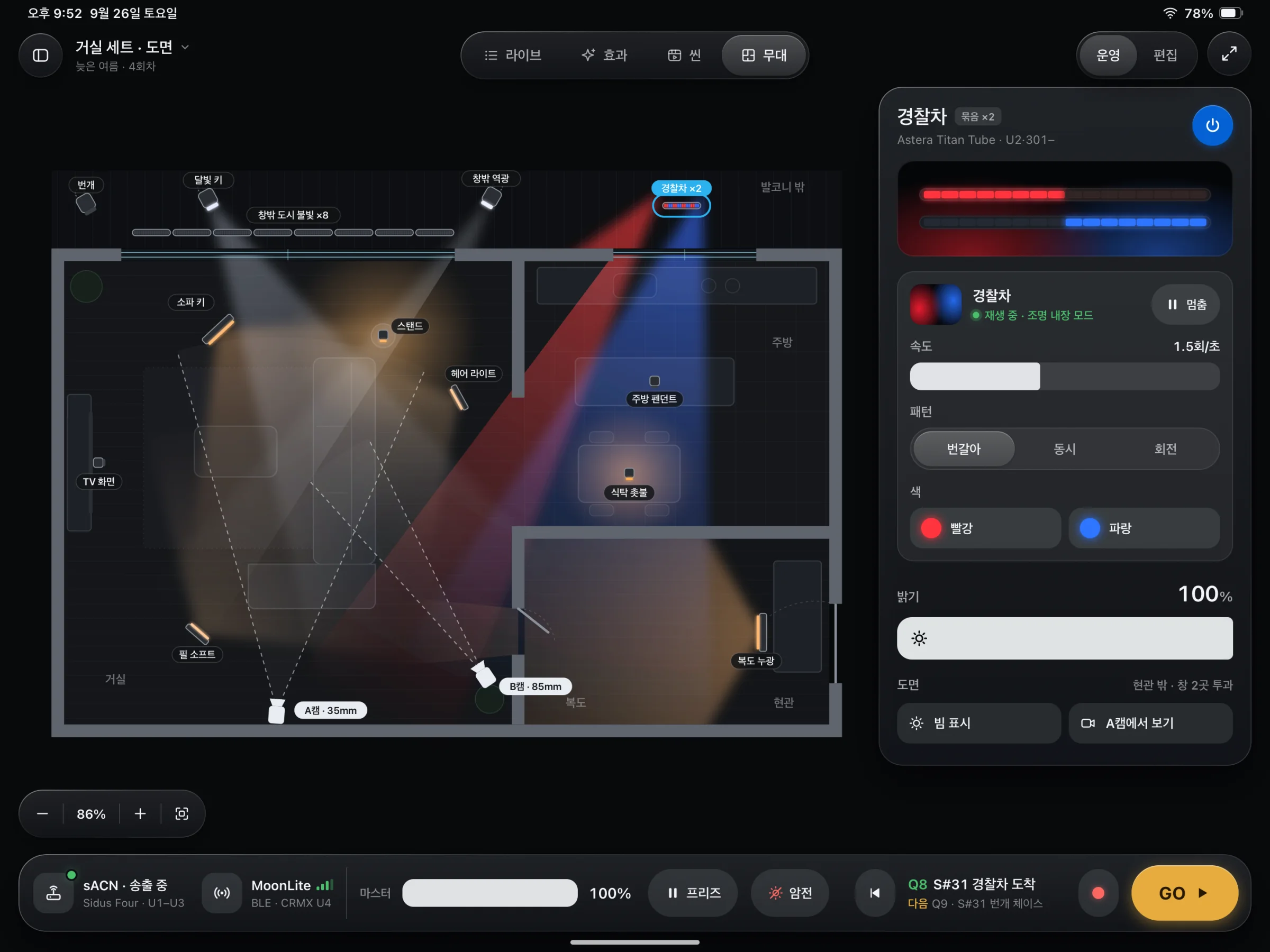
Bring in the art department’s SketchUp plan as it is and place your fixtures. Beams, light spilling through windows and the camera’s field of view are all drawn. You see the light before you step onto the set.
Pixel Mapping
Swipe to select from 128 pixels and color only the ones you picked. Apply fire, water or beacon video and the light flows according to where the tubes actually hang. No separate media server needed.
Interface · One screen
Pick on the left, push in the middle, refine on the right, GO at the bottom. No console training before your first shoot.
iPhone · iPad · Mac · MoonLite
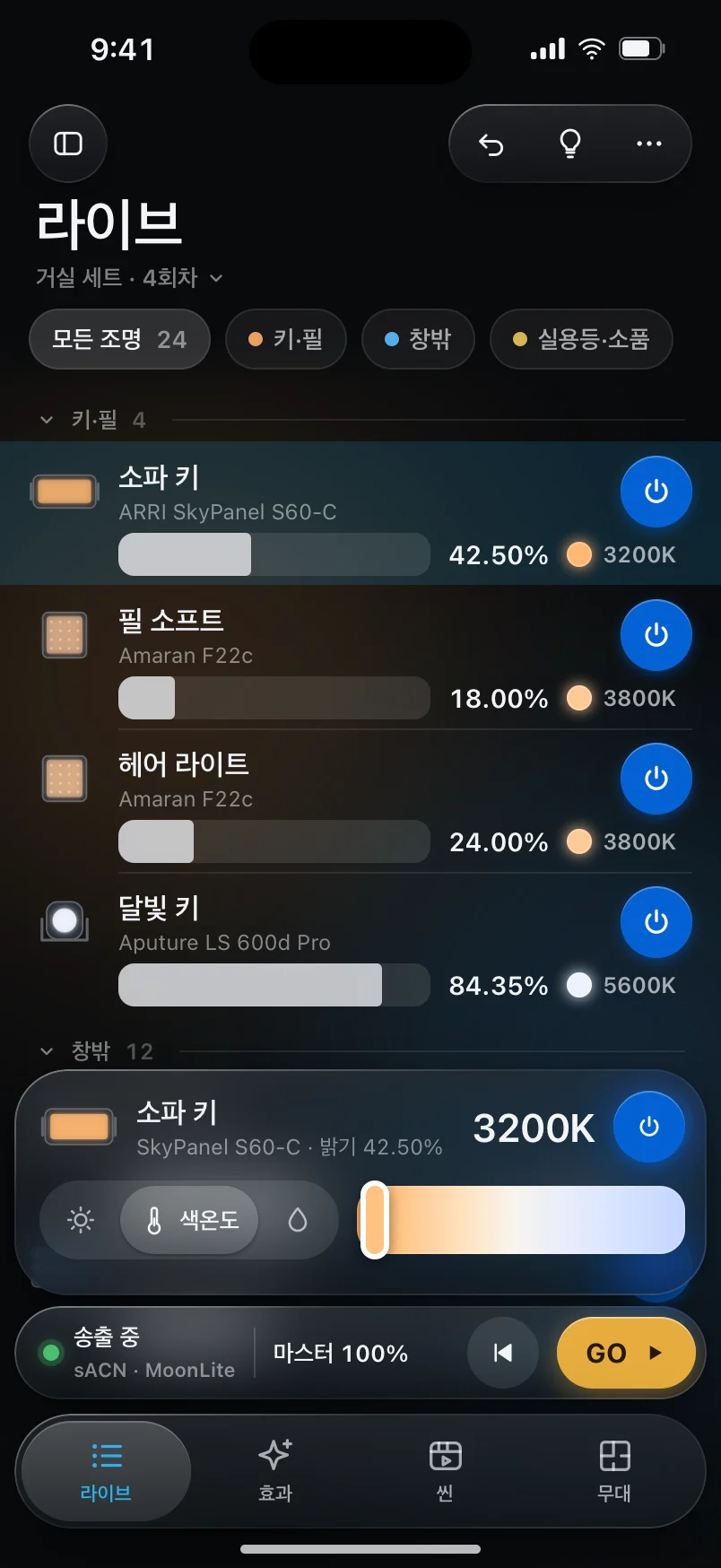
Pair a LumenRadio MoonLite to an iPhone or iPad over Bluetooth and you are sending CRMX wirelessly. From the bag to lights on, there is no rig to set up.
BITNA connects to MoonLite and TimoTwo over Bluetooth and sends CRMX directly. If the link drops, it finds the device and reconnects on its own.
When an iPad takes over a show running on the Mac, it picks up through sACN priority, so the lights never go out, not even for a moment.
The lead’s device is the host, and the crew control the same show from their own phones at the same time. Even from the far side of the set.
All‑in‑one
Fixture Library
0
Missing one? Add the manufacturer’s DMX chart (PDF or photo). BITNA reads it on the device and builds the profile.
Scene Timeline
Two lightning strikes, one explosion. Lay them out frame by frame and GO on the director’s call.
Gel Filters
Pick from 250 LEE filters by number. Based on a tungsten or daylight source, BITNA outputs the color of that gel.
MIDI
Connect a MIDI controller and map fixtures to its faders. When a value changes on screen, the controller’s lights follow.
Built‑in FX
Turn on the effects and modes inside your fixtures right from BITNA. No need to open a separate app for each fixture.
Connect
On Set
Run moving light along the tubes beside the car and streetlights pass through the cabin. Set the car’s speed with a finger, on the director’s call.
Take just an iPhone and a MoonLite. No laptop out of the truck; you finish before the sun goes down.
Draw the plan on location, place each fixture where it was rigged, and switch them on and off with a fingertip. No more guessing what you hung where.
Even on a set that runs for months, save the values and layout ahead of time. On shoot day, one load and you’re done.
Pricing · Planned launch prices
No features are locked. Choose by the number of fixtures you run and the size of your crew.
Even when a trial ends or you reach a limit, fixtures that are outputting stay on until you’re done. Notices wait until the shoot is over.
Only days you actually send DMX count, not calendar days. Days the app sits installed and unused don’t count.
Buy once and you’re done. No subscription, no fine print.
0KRW
Personal work, small sets
249,000199,000KRW
Lifetime license · most film sets
499,000KRW
Lifetime license · large installs · big crews
45,000KRW
Lifetime license · for crew members
Prices shown are planned launch prices in Korean won and may change.
Beta · Try it first
We’ll invite you to the beta first. Use it on set and tell us right away what gets in your way. BITNA is finished with those stories.
FAQ
Anything else? Send us a question.
Yes. iPad and iPhone can each be the host and output DMX directly. Use the Mac when a big screen is handy.
The app includes the GDTF catalog of 1,261 fixtures. Search by name and patch right away. For a model that isn’t there, add the manufacturer’s DMX chart (PDF or photo) and BITNA reads it on the device to build the profile.
Connect over Bluetooth to a LumenRadio MoonLite or TimoTwo and send CRMX directly, or use an sACN or Art‑Net network node, or a USB DMX interface.
Yes. BITNA is built to work offline first. Sign-in or network status never blocks lighting control.
Only days you actually output DMX count, not calendar days. Days the app is installed but not used don’t count down. When the trial ends, you can keep using Free.
Never. The session that is outputting is kept until it ends, and you’ll see the notice the next time you open the app.
Tell us on the bug report page. You can follow the fix with your report number, and problems that stop a shoot or show are looked at first.